Printer Stand
Stand Parts
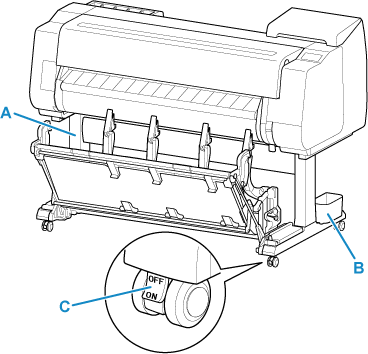
- A: Stand Unit
- A stand that holds the printer. Equipped with casters to facilitate moving the printer.
- B: Accessory Pocket
- Stores the printer's accessories.
- C: Locking Caster
- The casters can be locked securely. When moving the printer, be sure to unlock the 4 casters. If you move it while the locking casters are locked, the floor may become scratched.
Parts of the Basket
The following Basket can be used with the printer.
TX-4310 / TX-5431 : Basket BU-09
TX-3310 / TX-5331 : Basket BU-08
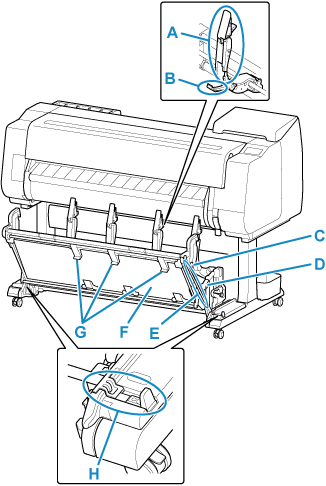
- A: Paper Guide
- Guides the output printed documents to the basket.
- B: Adjustable Stopper
- Extends according to the paper size when using the basket in the extended position A.
- C: Support Rod
- When changing the position of the basket, change the position of the Support Rod.
- D: Basket Release Lever
- Releases the basket when it is set in the extended position B and the lever is pulled forward.
- E: Basket Arm
- You can store the basket by laying it horizontally.
- F: Basket Cloth
- Catches the ejected printed documents.
- G: Basket Ejection Guides
- This guide supports output paper when using the basket in the extended position B.
- H: Basket Lock Lever
- Restrict the movement of the basket arm by moving it to the
 side.
side.
 Note
Note
-
For instructions on how to use the basket, see "Using the Basket on the Printer Stand" and "Retract the Basket on the Printer Stand".
