Loading Envelopes
The address is automatically rotated and printed according to the envelope's direction by specifying with the printer driver properly.
 Important
-
Do not use the following envelopes. They could jam in the printer or cause the printer to malfunction.
-
Envelopes with an embossed or treated surface
-
Envelopes with a double flap
-
Envelopes whose gummed flaps are already moistened and adhesive
-
-
Prepare envelopes.
-
Press down on all four corners and edges of the envelopes to flatten them.
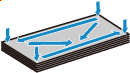
-
If the envelopes are curled, hold the opposite corners and gently twist them in the opposite direction.

-
If the corner of the envelope flap is folded, flatten it.
-
Use a pen to press the leading edge in the inserting direction flat and sharpen the crease.
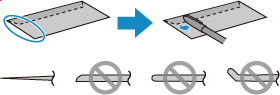
The figures above show a side view of the leading edge of the envelope.
Important-
The envelopes may jam in the printer if they are not flat or the edges are not aligned. Make sure that no curl or puff exceeds 0.12 in. (3 mm).
-
-
Pull out the cassette (A) from the printer.
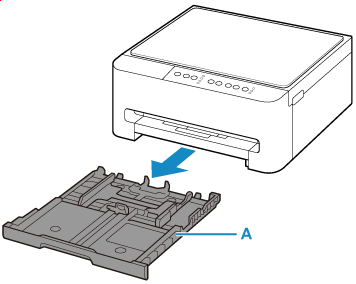
-
Slide paper guides (B) in front and (C) on right to open guides.
Load envelopes in portrait orientation WITH THE PRINT SIDE FACING DOWN, and place it in center of cassette.
Up to 10 envelopes can be loaded at once.
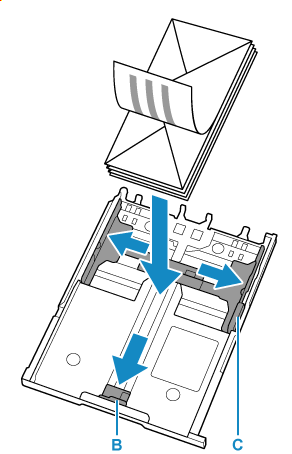
Set the envelopes in portrait orientation with the address side down and the folded flap on the right.

 Note
Note-
Align paper with the line on the cassette to load.
Paper may not be fed into the printer correctly if it presses against the protrusion (D).
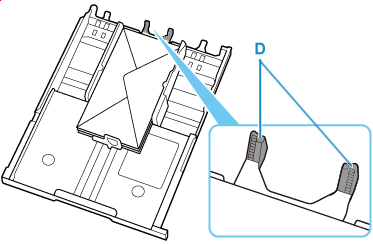
-
-
Move the paper guide and adjust the guides to edge of the paper stack.
Do not slide the paper guides too tightly against the paper. The paper may not be fed properly.
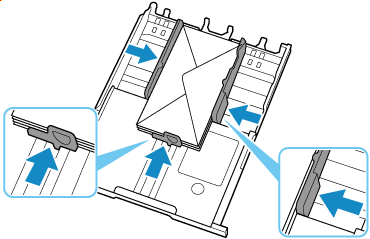
-
Insert cassette into printer.
Push the cassette into the printer until it stops.
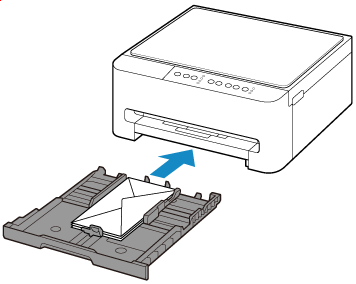
When the cassette is inserted, the Paper lamp flashes.
-
Press Paper Select button (E) to select
 and press OK button (F).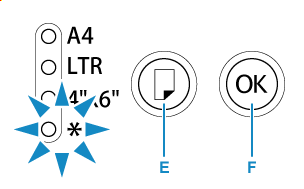
Use a Web browser to configure the paper information according to the envelopes loaded in the cassette.
-
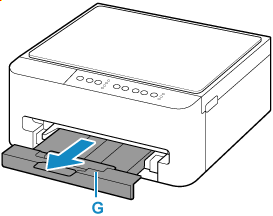
Pull out the paper output tray (G).
Note
-
To prevent incorrect printing, this printer has a function that detects whether the paper size set for the paper loaded in the cassette matches the paper size set when printing. Configure the print settings according to the paper size set for the paper loaded in the cassette. When this function is enabled, the Alarm lamp flashes to prevent incorrect printing if an incorrect paper size is set. If that happens, correct the paper size that is set.
