When Error Occurred
If an error occurs while printing, for example, if the paper runs out or jams, the troubleshooting message will be displayed on the computer screen and the printer's Alarm lamp and/or ON lamp will flash.
If you are using Windows, the support code (error number) may be displayed with the message.
If you are using macOS, you can check the support code (error number) on the Remote UI.
Take the appropriate action described in the message.
When a Support Code and a Message are displayed on the Computer Screen (Windows):
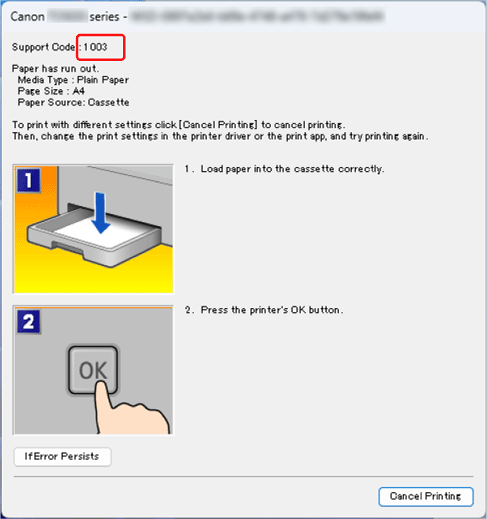
For details on resolving the error, see List of Support Code for Error.
For messages, refer to Message Is Displayed.
When the Alarm lamp and/or ON lamp flashes:
The flash pattern and number of flashes vary depending on the cause of the error.
The Alarm lamp will flash/light when an error occurs that has a clear cause and remedy, such as when no paper is loaded or the paper is jammed.

When an error occurs that may require repair, the Alarm lamp and ON lamp will flash alternately.

See Alarm Lamp and ON Lamp in the Event of an Error for the flashing/lighting of the lamps when an error occurs.
 Note
Note
-
You can download the App
 using the QR code below and check for errors from your smartphone/tablet.
For iOS:

For Android:

