
Checking Ink Status on the Touch Screen
-
Select
 (Hint) on HOME screen.
The hint menu screen will appear.
-
Select
 Estimated ink levels.
A symbol appears in the area A if there is any information about the remaining ink level.
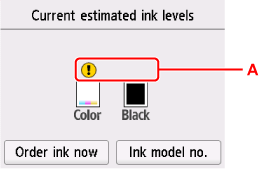
 The ink is running low. Prepare a new ink cartridge.
-
 The ink has run out. Replace the ink cartridge.
  This appears when remaining ink level is not known.
 Note
Note-
The above screen shows estimated ink levels.
-
To access the ink purchasing site, select Order ink now on this screen and display the QR code. Cost of connecting to Internet is to be born by the customer.
-
Selecting Ink model no. displays the Ink model number screen for checking ink numbers.
-
You can also check the ink status on a screen of the touch screen displayed while printing.
-
You can also check the ink status on the computer screen.
-
For Windows:
-
For macOS:
-
