 Cannot Connect Smartphone/Tablet to Wireless Router

-
Check Is the Wi-Fi antenna displayed on your smartphone/tablet?
-
Example (iOS device):
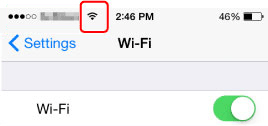
-
Example (Android device):
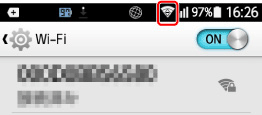
If the antenna is not displayed, your device's wireless function is disabled. Enable wireless function on your device and connect it to a wireless router. For more on the procedure, refer to your device's instruction manual or visit the manufacturer's website.
 Note
Note- The setup on your smartphone/tablet will be easier when you complete setting up a wireless printer connection on your computer in advance.
-
This web page contains information about several models. Depending on the specifications of the printer you are using, some of the features described (device functions, connection method, operating procedure and etc.) may not apply. For details about the functions of your printer, see Product Specifications.
-
