Detect image size and Print centered
Operation is as described below when both Detect image size and Print centered are specified.
TM-615/TM-515/TM-5615/TM-5515
-
When OFF or Command priority is selected for Detect image size and ON is selected for Print centered:
Print centered is performed in accordance with the command-specified image drawing range.
-
When Detected size is selected for Detect image size and ON is selected for Print centered:
Print centered is performed in accordance with the detected minimum image range.
Detect image size AND Print centered EXAMPLE
-
When OFF or Command priority is selected for Detect image size and ON is selected for Print centered:
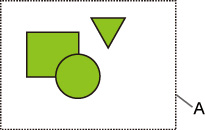
- Command-specified image drawing range
Printed image
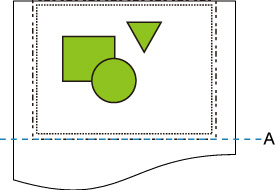
- Position of cut
Prints the command-specified image drawing range in the horizontal center of the roll paper.
-
When Detected size is selected for Detect image size and ON is selected for Print centered:
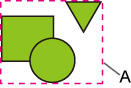
- Minimum image range detected
Printed image
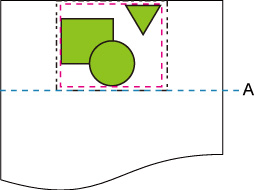
- Position of cut
Prints the minimum image range in the horizontal center of the paper.
TM-610/TM-600/TM-510/TM-500/TM-5610/TM-5600/TM-5510/TM-5500
The image drawing range determined based on the Detect image size setting is printed in the center of the paper.
Detect image size AND Print centered EXAMPLE
A: The image drawing range determined based on the Detect image size setting
Printed image
A: Position of cut
The image drawing range determined based on the Detect image size setting is printed at the center of the paper.
