Operation Panel
 Note
Note
-
The tilt of the operation panel can be adjusted in three steps.
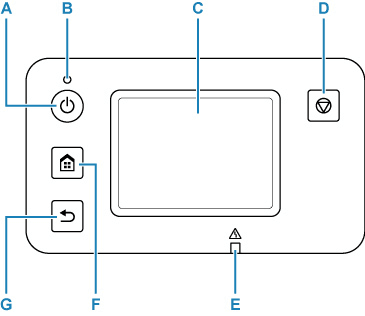
- A: ON button
-
Turns the printer on or off.
- B: ON lamp
- Remains lit after flashing when the printer is turned on.
- C: Touch Screen
-
Displays messages, menu items, and operating status. Touch the screen lightly with your finger to select a menu item or button.
- D: Stop button
- Cancels printing.
- E: Alarm lamp
- Lights up or flashes in case of errors.
- F: HOME button
-
Used to display the HOME screen.
- G: Back button
- Returns to the previous screen.
