Front
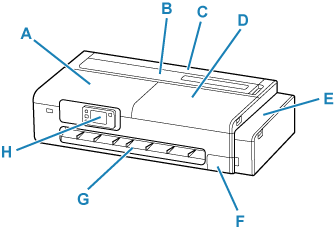
- A: Access Cover
-
Open when performing printer maintenance or when removing jammed paper.
- B: Cut Sheet Feed Cover
-
Open when loading sheets, postcards, envelopes or medicine envelopes in the top feed.
- C: Roll Paper Feed Cover
-
Open when loading rolls. Operate with the cut sheet feed cover open.
- D: Access Cover
-
Open when performing printer maintenance or when removing jammed paper.
- E: Ink Tank Cover
-
Open to refill ink tanks.
- F: Maintenance Cover
-
Open when replacing the maintenance cartridge.
- G: Output Guide
- Supports output paper.
- H: Operation Panel
-
Use to change the settings of the printer or to operate it.
The tilt of the operation panel can be adjusted in three steps.
Inside of Ink Tank Cover, Inside of Maintenance Cover
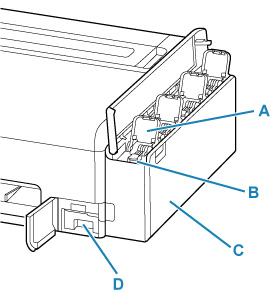
- A: Ink Tank Inner Cover
- Open to refill ink tanks.
- B: Tank Caps
- Open to refill ink tanks.
- C: Ink Tanks
-
Containers for ink inside the printer. Refill when the ink runs low.
- D: Maintenance Cartridge
Maintenance Cartridge
Model number: MC-32
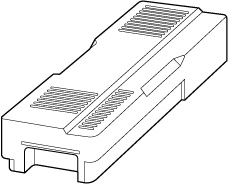
Absorbs ink used for cleaning.
 Important
-
When purchasing, check the Model number.
