
Copying
This section describes how to load originals and copy them to plain paper.
-
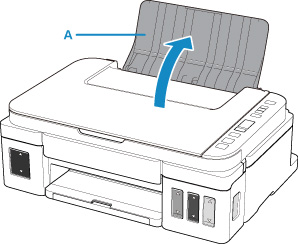
Open the paper support (A).
-
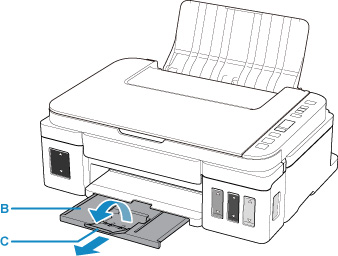
Pull out the paper output tray (B) and open the output tray extension (C).
-
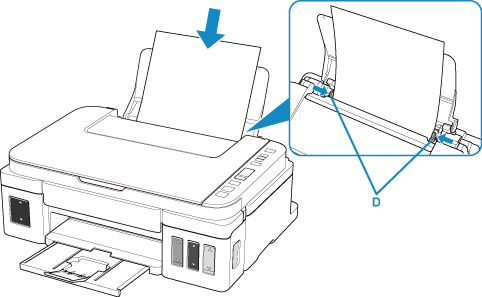
Load paper WITH THE PRINT SIDE FACING UP.
-
Align the paper guides (D) with the paper width.
-
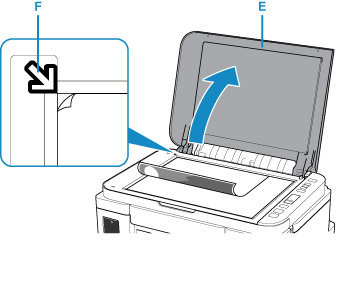
Open the document cover (E).
-
Load the original WITH THE SIDE TO COPY FACING DOWN and align it with the alignment mark (F).
-
Close the document cover.
-
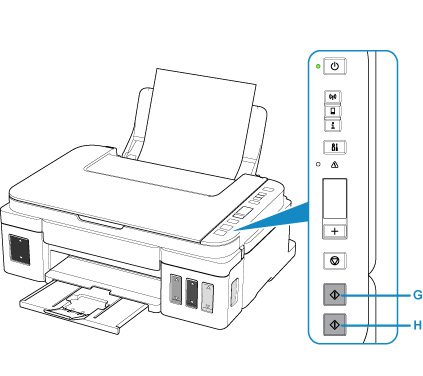
Press the Black button (G) or Color button (H).
 Important
-
Do not open the document cover until copying is complete.
 Note
Note
-
Your printer is equipped with many other convenient copy features.
