
Inside View
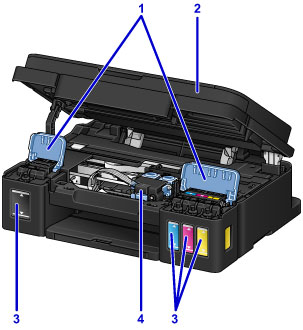
- (1) ink tank covers
- Open to refill ink tanks.
- (2) scanning unit / cover
- Scans originals. Open to refill ink tanks or to remove jammed paper.
- (3) ink tanks
-
The black ink tank is on the right, and the color ink tanks (cyan, magenta, and yellow) are on the left.
If any ink levels are low, refill the low tanks.
- (4) cartridge holder
- Install the cartridge here.
 Note
Note
- For details on refilling ink tanks, see Refilling Ink Tanks.
