
1471
Cause
Print head cannot be recognized.
What to Do
A print head may not be installed properly or may not be compatible with this printer.
If you are printing, press the printer's RESUME/CANCEL button to cancel printing.
Remove the print head and reinstall it properly following the steps below. This may resolve the error.
-
Open top cover.
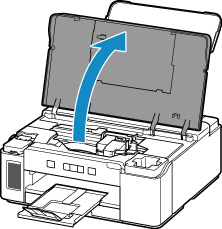
-
Close ink valve.
Tilt the ink valve lever tightly to the left.
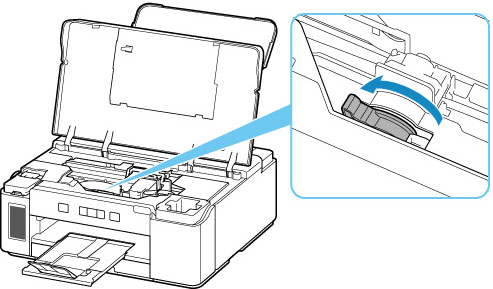
-
Grab knob (A) on print head locking cover to open it.
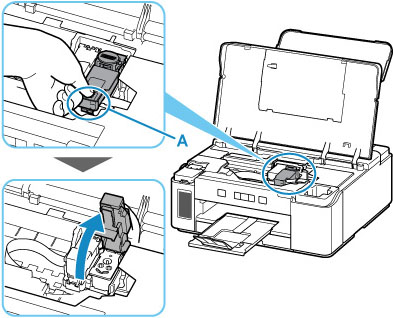
-
Remove print head.
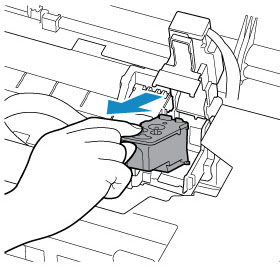
 Important
- When removing the print head, handle it carefully so that ink does not spatter.
- Do not touch the tube or other parts inside the printer. Touching these parts may cause the printer to malfunction.
-
Do not touch the gold terminal (B) or print head nozzles (C) on a print head. The printer may not print properly if you touch them.
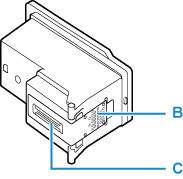
-
Reinstall print head properly.
Use the print head compatible with the printer.
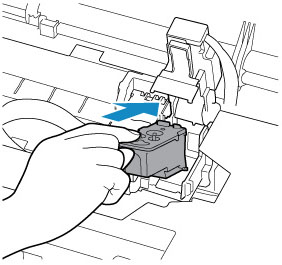
-
Close print head locking cover and push it down.
Press firmly the print head locking cover until it clicks into place.
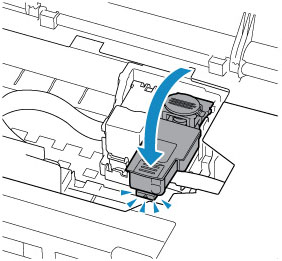
-
Press down joint button.
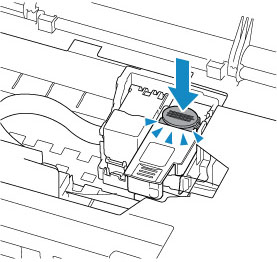 Important
- Push the joint button firmly until it clicks into place; otherwise, printing may become impossible.
-
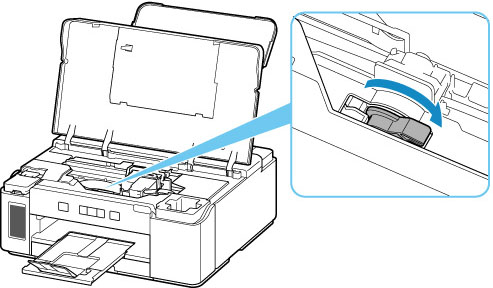
Open ink valve.
Tilt the ink valve lever tightly to the right.
-
Close top cover.
