1431
Cause
A print head may not be installed properly or may not be compatible with this printer.
What to Do
Remove the print heads and reinstall them properly following the steps below.
-
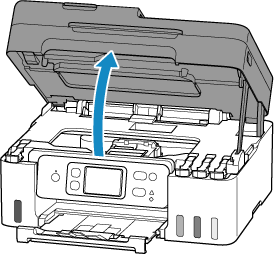
Open scanning unit / cover.
-
Press and hold printer's Stop button for 5 seconds.
The print head holder moves.
 Caution
- Do not hold the print head holder to stop or move it forcibly while the print head holder is working. Do not touch the print head holder until it stops completely.
-
Grab knob (A) on print head locking cover to open it.

-
Pull the print head (B) and shift it slightly toward you.

-
Remove color and black print heads.

 Important
- When removing the print heads, handle them carefully so that ink does not spatter.
- Do not touch the tube or other parts inside the printer. Touching these parts may cause the printer to malfunction.
-
Do not touch the gold terminal (C) or print head nozzles (D) on a print head. The printer may not print properly if you touch them.

-
Reinstall print heads properly.
Install the color print head in the left holder and the black print head in the right holder.

-
Close print head locking cover (E) and push it down.
Press firmly the print head locking cover until it clicks into place.

-
Close scanning unit / cover gently.
If reinstalling the print heads does not solve the problem, it may be necessary to replace the print heads.
For details, click Print head.
