Item Edit Screen (Thumbnail List View)
Click  (Thumbnail List View) in the Item edit screen to display a list of thumbnails of all pages in the item being edited; add, delete, or duplicate pages or use other functions as needed. You can also rearrange pages.
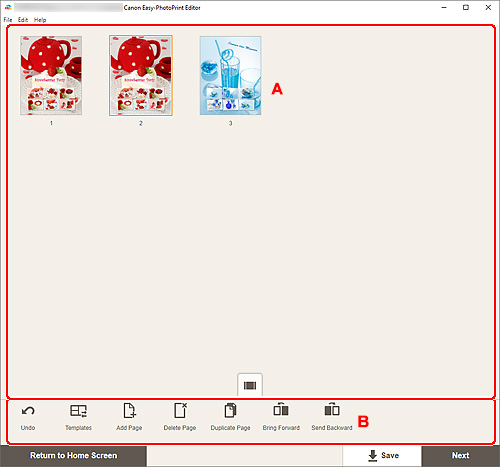
A: Pages Area
Displays a list of thumbnails of all pages in the item.
 (Single Image View)
- Click to switch to the Item edit screen.
B: Editing Tools Area
 Note
Note
- The displayed contents vary depending on the item.
 Undo
Undo-
Undoes the last operation.
Each click restores the previous state.
 Templates
-
You can change the template.
Note- For details on how to change the template, see Changing Template.
 Add Page
- Adds a new page after the selected page.
 Delete Page
- Deletes the selected page.
 Duplicate Page
- Duplicates the selected page.
 Bring Forward
- Moves the selected page up one page.
 Send Backward
- Moves the selected page down one page.
Note
- For details on how to add, delete, duplicate, or rearrange pages, see Adding, Deleting, or Rearranging Pages.
