
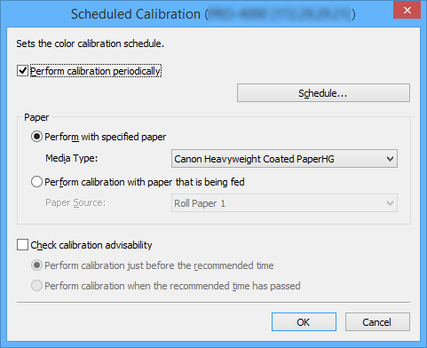
Scheduled Calibration Dialog Box
Set the schedule for color calibration.
To open the Scheduled Calibration dialog box, select Scheduled Calibration from the Execute menu.
 Important
-
Models that do not support roll paper also do not support scheduled color calibrations.
- Perform calibration periodically
-
Check this check box to perform automatic scheduled color calibrations.
-
To specify the date and time that the color calibration will be performed, click the Schedule button to open the Schedule Settings dialog box.
 Note
Note-
To perform scheduled color calibrations, use the Resident Service Settings dialog box to start the Device Management Console resident service.
-
- Paper
-
Select the paper to be used for color calibration.
- Perform with specified paper
-
Performs color calibration for the paper selected in Media Type. If the selected paper is not loaded, color calibration will not be performed.
- Perform calibration with paper that is being fed
-
Performs color calibration for the paper loaded in the selected Paper Source. Color calibration will not be performed if there is no paper loaded in the selected paper source, or if the paper that is loaded is not supported by color calibration.
- Check calibration advisability
-
Check this check box to perform color calibration once the calibration advisability reaches a certain level.
- Perform calibration just before the recommended time
-
Color calibration will be performed when the Calibration advisability progress bar on the main screen is yellow or red.
- Perform calibration when the recommended time has passed
-
Color calibration will be performed when the Calibration advisability progress bar on the main screen is red.

