
Check Operation Status Dialog Box
Select Check Operation Status from the Tools menu to display.
A list of errors that occurred when acquiring job logs will appear on the Job Log Acquisition Status sheet.
The operation status of scheduled job cost data exports will appear on the Scheduled Export of Cost Information sheet.
Job Log Acquisition Status Sheet
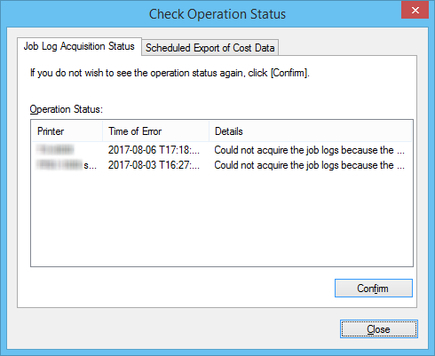
- Operation Status
-
The acquisition status in a list appear.
- Printer
-
The printer name appears.
- Time of Error
-
The time the error occurred appears according the display format setting.
-
If the same error occurred multiple times, displays the time the error last occurred.
- Details
-
A description of the error appears.
 Note
Note-
The numbers that appear at the end of Details are added for internal identification in the software.
-
- Confirm button
-
Errors currently shown do not appear in the future.
Scheduled Export of Cost Information Sheet
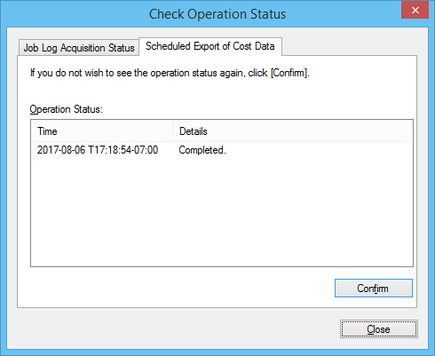
- Operation Status
-
Displays the status of scheduled exports in a list.
- Time
-
Displays the time that each scheduled export of cost information was performed.
- Details
-
Displays the results of the scheduled exports.
- Confirm button
-
The results currently being displayed will no longer appear on the list.
