Setting Units Displayed
Set the units displayed in Accounting Manager.
To open the Preferences dialog box, select Preferences/Settings in the Canon Accounting Manager menu.
Setting Units
Set the units displayed in Accounting Manager on the Unit sheet in the Preferences dialog box.
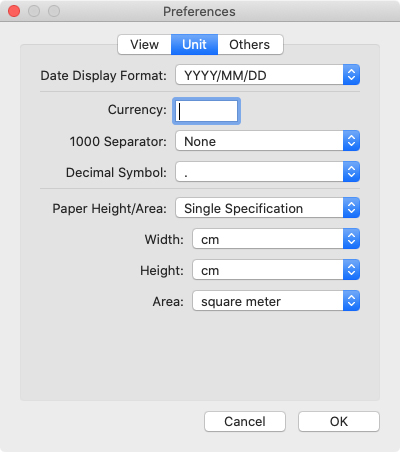
- Date Display Format
-
Use this option to select the display format for dates.
-
"YYYY" indicates the year, "MM" the month and "DD" the day.
- Currency
-
Enter the currency unit.
-
Enter a text string up to 3 characters long.
- 1000 Separator
-
Use this option to select the symbol used as a separator in numbers.
-
The symbol is inserted every 3 digits.
- Decimal Symbol
-
Use this option to select the symbol used as a decimal point.
- Paper Height/Area
-
Select paper dimension specification from Single Specification, In metric units, or In US customary units.
-
- Width
-
Use this to select the unit used for paper width.
-
Enabled when you select Single Specification in Paper Height/Area.
- Height
-
Use this to select the unit used for paper length.
-
Enabled when you select Single Specification in Paper Height/Area.
- Area
-
Use this to select the unit used for paper area.
-
Enabled when you select Single Specification in Paper Height/Area.
