
Registering the Fax/Telephone Number of Recipients
Before you can use the machine's directory, you need to register the recipients' fax/telephone numbers. Follow the procedure below to register the recipients' fax/telephone numbers.
-
Select
 FAX on the HOME screen.
The Fax standby screen is displayed.
-
Use the


 button to select Function list, then press the OK button.
The Function list screen is displayed.
-
Use the
button to select TEL number registration, then press the OK button. -
Use the
button to select Directory registration, then press the OK button. -
Use the
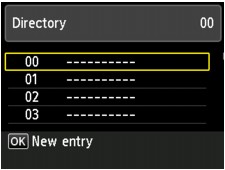
button to select Recipient, then press the OK button.The screen to select an ID number is displayed.
 Note
Note-
If you already registered the recipients, the recipients' name is displayed next to the ID number. If you already registered the group dial, (Not available) is displayed.
-
-
Use the
button or the Numeric buttons to select an unregistered ID number, then press the OK button. -
Use the
button to select a registration method, then press the OK button. -
Register the recipients' fax/telephone number.
Register the recipients' fax/telephone number depending on the registration method selected.
-
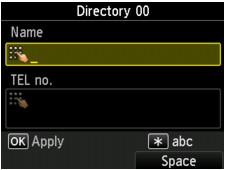
Direct entry
The screen to register the recipient's fax/telephone number and name is displayed. Go to next step.
-
From outgoing call log
When you select this registration method, the screen to select the fax/telephone number from the outgoing call logs is displayed.
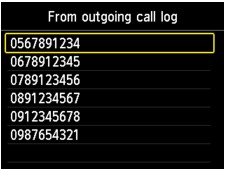
Using the
button to select a fax/telephone number and pressing the OK button, the screen to register the recipient's fax/telephone number and name is displayed. Go to next step. -
From incoming call log
When you select this registration method, the screen to select the fax/telephone number or the name from the incoming call logs is displayed.
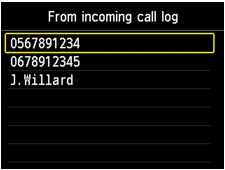
Using the
button to select a fax/telephone number or name and pressing the OK button, the screen to register the recipient's fax/telephone number and name is displayed. Go to next step.Note-
This registration method may not be available depending on the country or region of purchase.
-
-
-
Enter the recipient's name.
If you select From incoming call log as a registration method, the recipient's name may be already entered. If you do not change the name, go to next step.
-
Use the
button to move the cursor to the entry field of name. -
Enter the recipient's name.
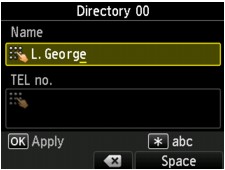
-
Press the OK button.
Note-
You can enter the name up to 16 characters, including spaces.
-
-
Enter the recipient's fax/telephone number.
If you select a fax/telephone number on From outgoing call log or From incoming call log, the fax/telephone number is already entered. If you do not change the fax/telephone number, go to next step.
-
Use the
button to move the cursor to the entry field of fax/telephone numbers. -
Enter the recipient's fax/telephone number.
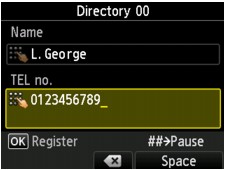
Note-
You can enter the fax/telephone number up to 60 digits (40 digits for the US, Canada, Korea and some regions of Latin America), including spaces.
-
When Telephone line type in FAX user settings under FAX settings is set to Rotary pulse, you can enter a tone ("T") by pressing the Tone button.
-
-
Press the OK button to finalize registration.
Note-
To register another recipient's number and name, select an unregistered ID number and operate in the same procedure.
-
You can check the recipient's numbers and names you have registered by printing RECIPIENT TELEPHONE NUMBER LIST.
-

